 UCI Studio Pro
What UCI Studio Pro does, and what it does not
Every capability on this page carries one of three labels: built and verified, built but not yet verified on hardware, or planned.
- Built and verified
- Built, not yet verified on hardware
- Planned
Verified means recorded as tested in the product's own records: on an x64 Windows test host and a Windows virtual machine, against a Core Nano running firmware 10.5. Nothing has been run on a production touch panel.
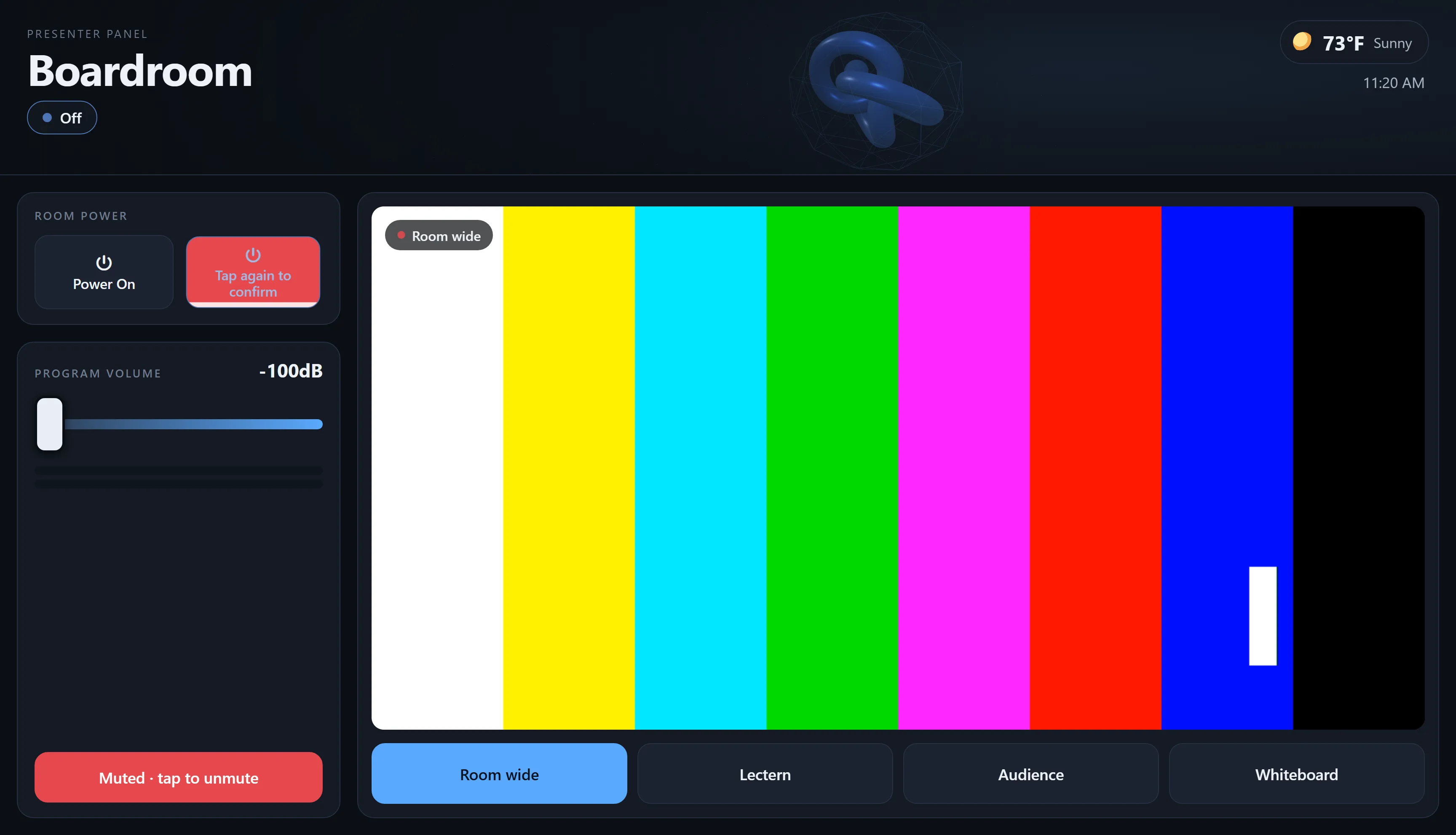
Learn about NDI at https://ndi.video/
Three ways to bind
Attributes, a hook map, or a typed JavaScript API. All three write to one signal store.
- Built and verified: Attributes Add
data-qsysattributes to an element. Twelve roles need no script: button, toggle, momentary, trigger, fader, knob, meter, label, LED, select, text and page. - Built and verified: A hook map
hooks.jsonwires an unmodified page by stable selectors, with 10 target types, 6 transforms and three directions. - Built and verified: The qsys JavaScript API A typed API for page code.
uciv typesgenerates TypeScript types from your design. - Built and verified: State as CSS Control state is written back into the page as attributes, classes and CSS custom properties such as
--qsys-position. - Built and verified: Optimistic writes An element is marked
qsys-pendinguntil the Core confirms the value. - Built and verified: Lint against the live design
uciv lintchecks every binding against the running design and reports errors with file and line. - Built and verified: Libraries from a CDN Unmodified test pages that load GSAP, Three.js and Tailwind from their CDNs run and drive their hooks.
uciv vendorcopies those files into the package so the panel runs without internet. - Built and verified: React Elements that React renders after page load bind with no extra code (tested with React 19 in a test page).
- Built, not yet verified on hardware: Svelte and Vue Built to bind the same way as React pages. Only React has a binding test.
- Built, not yet verified on hardware: Multi-state controls
cycleandstateshooks for controls with more than two states, from four kinds of Q-SYS source. - Built and verified: Measured A 500-element page bound in 6.9 ms, and a CSS animation across 200 bound controls held a 60 fps median. Both were measured in headless Chromium on an x64 Windows test host, not in the installed app.
- Built and verified
- Built, not yet verified on hardware
- Planned
index.html · your page
#mute · button
#volume · range input
#status · text
hooks.json
toggle · both
fader · both
label · in
Q-SYS design on the Core
Boolean · probe_gain/mute
Float · probe_gain/gain
String · probe_text/ProbeString
- writes and reads
- reads only
Author on the panel itself
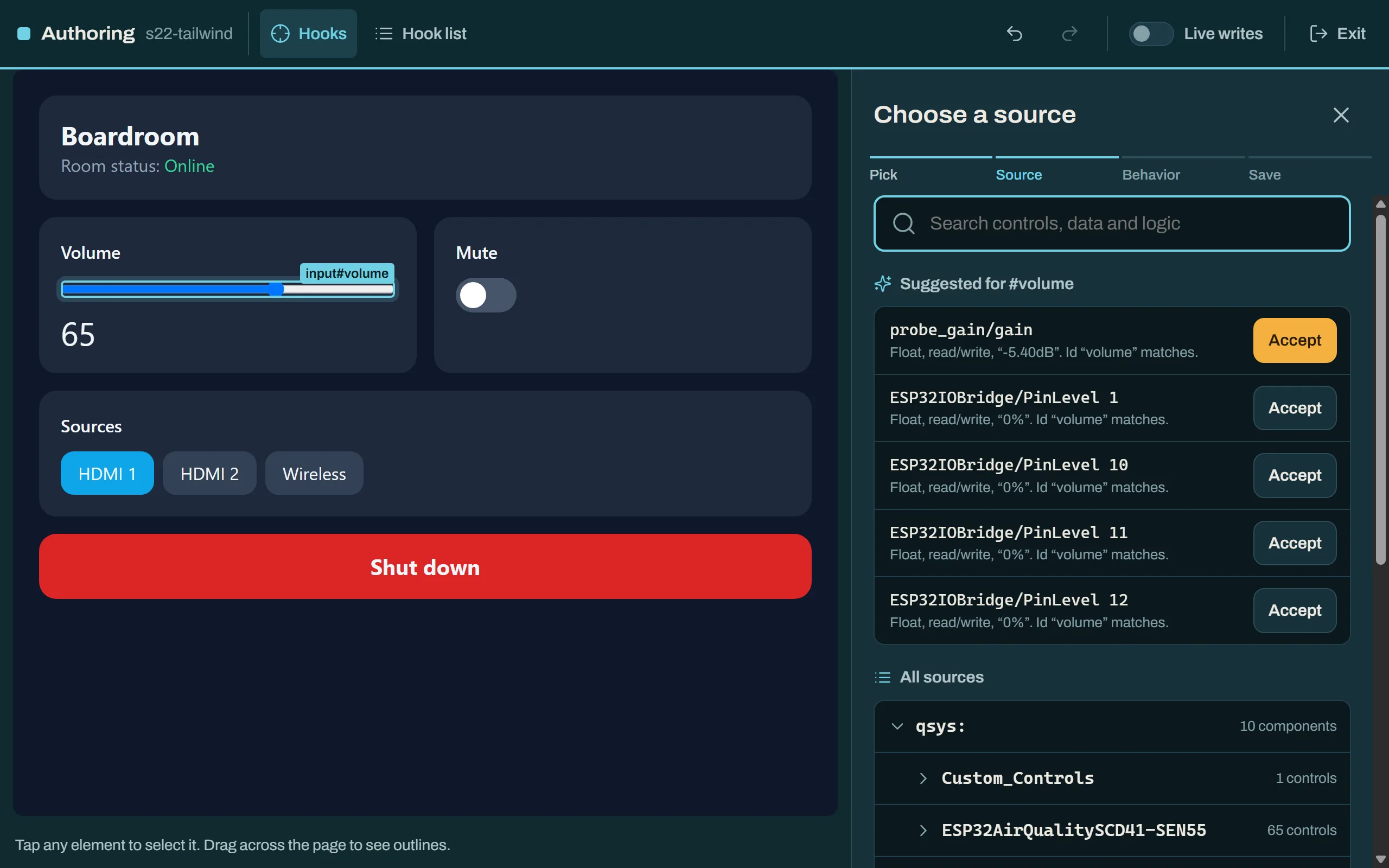
- Built and verified: Hook editor Point at an element of an unmodified page, pick a control, choose a behaviour. Undo restores the previous
hooks.jsonbyte for byte. - Built and verified: Code editor An editor on the panel for the page, the hooks and the scripts. Control names complete from the connected design, and a misspelled control shows an inline error.
- Built and verified: Live edits A CSS edit appears in under 1 second without a page reload, and an HTML edit reloads the page without a Core reconnect (installed build in a virtual machine, mock Core).
- Built and verified: Editor tools A file explorer, tabs, a command palette, find and replace, Format with Prettier, Emmet, and a Problems panel.
- Built and verified: Backups Every save keeps a backup, 50 per file by default, and a restore is byte for byte.
- Built and verified: Snippets A snippet library with built-in effects, and your own library, which may be a network share. Inserting a snippet previews every change and takes one Undo to remove.
- Built and verified: Operator themes Dark, Light, Classic and Match Windows themes for the operator screens. Your panel is never themed.
- Built and verified: Behind a PIN Authoring sits behind the settings PIN, and a provisioning file can switch it off so the panel cannot turn it back on.
- Built, not yet verified on hardware: Component templates Eleven built-in templates, among them a fader, a knob, a button group and a peak meter, each with one hook on its root.
- Built, not yet verified on hardware: Multi-state wizard In the hook editor, a wizard builds a multi-state hook and a plain sentence above Save says what the hook will do.
- Built, not yet verified on hardware: By finger The editors are built for touch. Every touch so far was injected on a virtual machine; no person has used them on touch hardware.
- What the editor is not It is not a full IDE: no debugger, terminal, git or extensions, and no find in files.
- Built and verified
- Built, not yet verified on hardware
- Planned
AI authoring over MCP
- Built and verified: A local MCP server
uciv mcpserves Claude Code, Claude Desktop and Codex. The client reads your running design, writes package files, runs lint, and gets screenshots and console output from the panel. - Built and verified: Your subscription The work runs in your own client under the subscription you already have. No API key is needed or read.
- Built and verified: How it was verified With Claude Code on a claude.ai Max subscription, Codex CLI on a ChatGPT login and Claude Desktop on a claude.ai sign-in, on a Mac with the server run from the product repository.
- Built and verified: Pairing The panel's authoring channel is LAN-only and pairs with a 6-digit code valid for 120 seconds. The panel listens only while authoring is open.
- Built and verified: Read-only by default A live Core is read-only to the client unless the server is started with
--allow-control. - Built and verified: Writes stay in the package The server's writes stay inside the package directory, except a snippet saved to your own snippet library, and the Core access key is removed from every tool output.
- Built and verified: Page text is marked untrusted Console output and page text returned to the client are marked as untrusted.
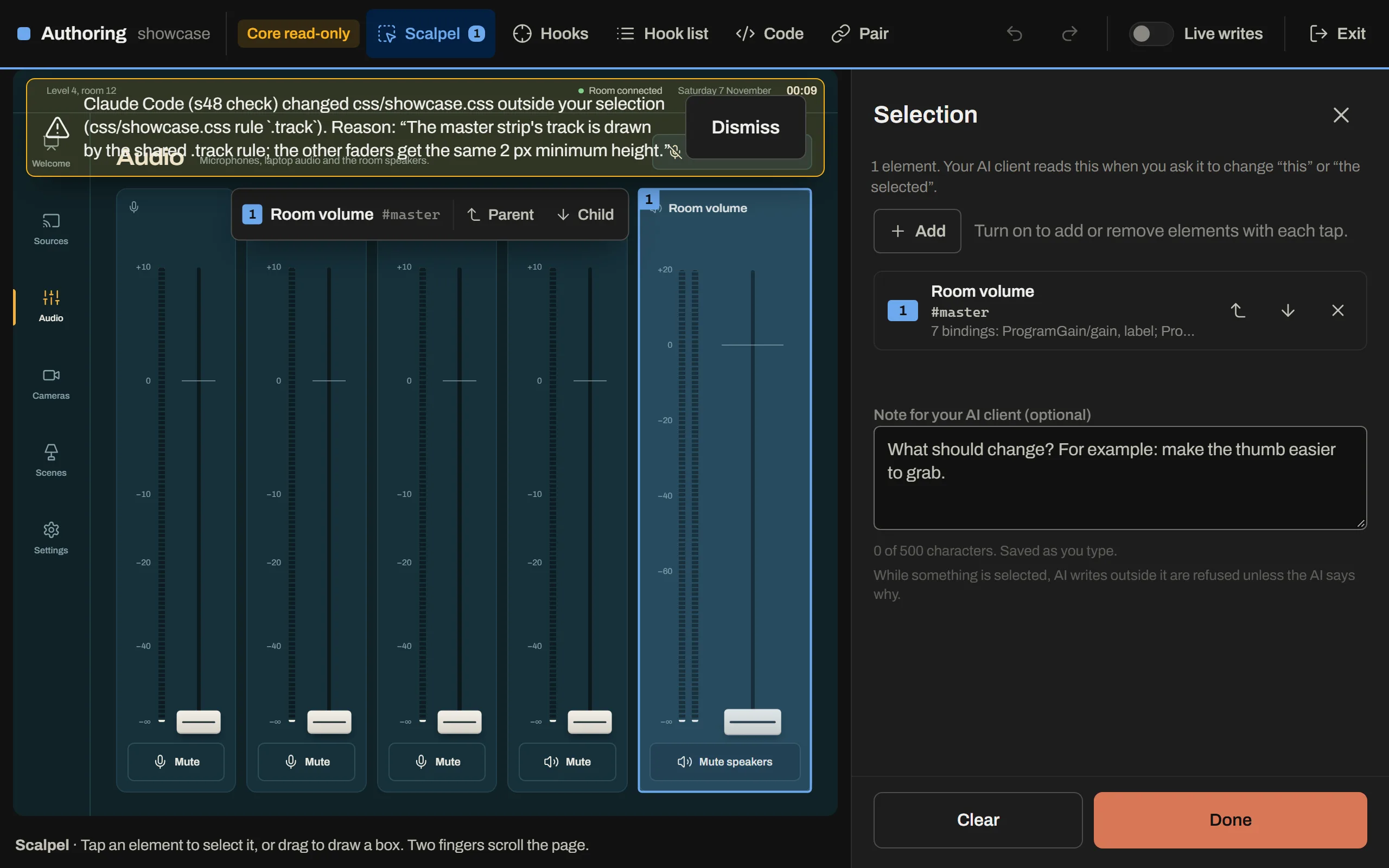
- Built and verified: The Scalpel Tap an element, step to its parent or child, or drag a box. Up to 16 selected elements and one note for the client. After a reload the selection is found again, and an element the page no longer has shows as Lost.
- Built and verified: The Scalpel guard While the panel holds a selection, the server refuses a package write outside it. A write outside needs a stated reason, which the panel shows until dismissed and the logs record.
- Built and verified: What the guard does not cover The guard, the read-only Core rule and package-scoped writes protect the
uciv mcppath only. A client that edits files with its own tools can write around them. - Built and verified: Proof A Claude Code session working only through
uciv mcpproduced a demo panel that passes lint against the live Core with no hand edits to the HTML. - Built and verified: Measured A
hooks.jsonwrite showed on the panel in 67 ms median and 991 ms at most, over 10 writes, with the app in a Windows virtual machine and the server on a Mac. - Built and verified: Without MCP
uciv promptwrites the same design context to a file for any assistant. - Built, not yet verified on hardware: One-command pairing
uciv connect <panel address> <code>pairs with the panel and registers the server in one step. - Built, not yet verified on hardware: Other clients and the Scalpel Claude Code asks for the selection by itself when you say "this". Claude Desktop and Codex are not verified to.
- Built, not yet verified on hardware: iPad and iPhone panels The server can attach to a paired iPad or iPhone on the same network.
- Not over the internet The server runs locally and its panel channel is LAN-only.
- Built, not yet verified on hardware: What you need on the desktop Today most of the desktop tools are run from the product repository, which is not public: authoring on a Mac, registering the server in Claude Desktop,
uciv devand headless previews all need Node 24 and a checkout. The Windows installer includes aucivcommand, built and not yet verified on Windows.
- Built and verified
- Built, not yet verified on hardware
- Planned
Video sources, by status
One <qsys-video> element plays every source and is drawn in the page, so CSS applies to it.
Video never travels over the control link to the Core.
- Built and verified: Local files H.264 files from the package or a media folder, with playlists and seeking. HEVC and ProRes are not supported.
- Built and verified: NDI NDI sources on x64 Windows, with source discovery. The ARM64 build has no NDI.
- Built and verified: NDI, measured Four NDI tiles played at once at a 60.1 fps median each: 240 px tiles on four 1080p60 senders, each receiver at its lowest bandwidth (640×360), on an x64 test host.
- Built and verified: HLS Live HLS, with recovery from a 30-second source outage without a page reload.
- Built and verified: Switching from the Core Changing a bound Q-SYS String control switches the clip within 500 ms.
- Built, not yet verified on hardware: RTSP H.264 over RTSP. It has run against test servers only; no camera or encoder product is recorded as playing.
- Built, not yet verified on hardware: RTSP over TLS Built, and tried against test servers, not against a camera that serves TLS.
- Built, not yet verified on hardware: Q-SYS preview streams Built to take the stream address live from the component. Not tried: no Q-SYS video hardware has been on the bench.
- Built, not yet verified on hardware: USB capture Experimental and off by default. No capture card has been tested.
- Built, not yet verified on hardware: The ARM64 build Which sources other than NDI the ARM64 build plays is not settled in the product's records.
- Not supported H.265 cameras do not play. NDI audio and NDI output are not supported.
- Built and verified
- Built, not yet verified on hardware
- Planned
Learn about NDI at https://ndi.video/
Running as a room panel
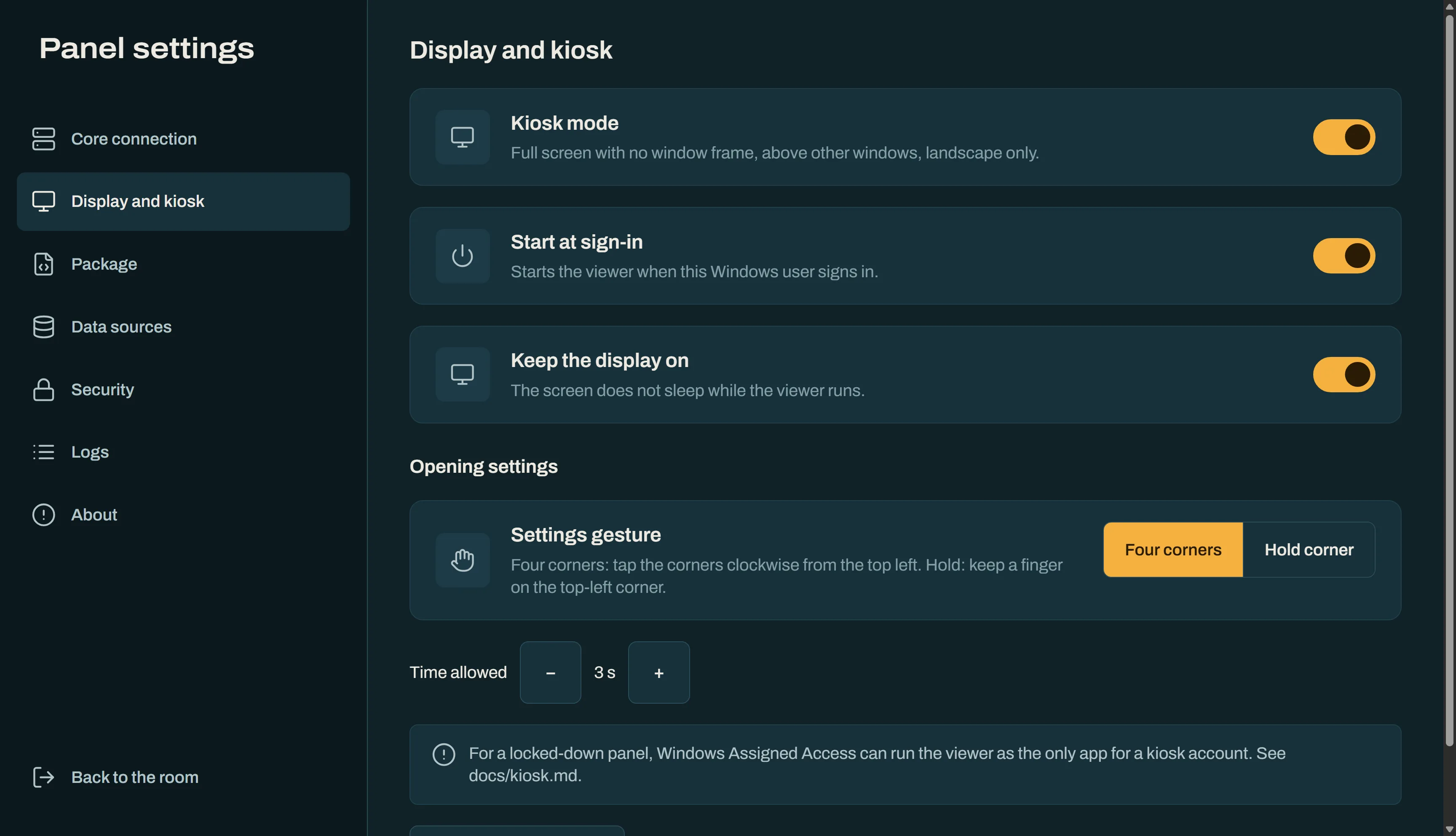
- Built and verified: Kiosk mode Borderless fullscreen, start at sign-in, keep the display on, landscape lock, a single instance.
- Built and verified: After a reboot In a virtual machine, the app started into kiosk mode and reconnected with no input.
- Built and verified: Settings gesture and PIN Settings open with a four-corner gesture and then a PIN. Five wrong PINs lock it for 60 seconds, doubling up to 15 minutes.
- Built and verified: A screen for every connection state Each of the seven connection states has its own overlay.
- Built and verified: Provisioning A
config.jsonfile read at every start sets up the panel and never holds a secret. With the Core address and the package in it, first-run setup is skipped. - Provisioning and licences Planned: provisioning becomes part of the Commercial licence.
- Built and verified: The Core's certificate The Core's certificate is pinned on first use. A changed certificate is refused and shown, with no retry until someone trusts it again.
- Built and verified: The access key The Core access key is stored in the Windows credential store and never appears in configuration files, logs or package folders.
- Built and verified: Network drop After a 30-second network drop, bound controls were live again 1.9 seconds after the network returned, with no page reload (one run, virtual machine, bench Core).
- Built and verified: Design redeploy A redeploy on the Core is detected, the design is rediscovered and the panel is re-bound. One observed run took 10.8 seconds (virtual machine, bench Core).
- Updates The app updates itself from an https address set in the provisioning file and refuses an update whose signature does not verify. It has no built-in update address. Self-update has been exercised on x64 only; the ARM64 path has not been run.
- Built, not yet verified on hardware: Zoom and gestures locked Pinch zoom, the context menu, text selection and swipe navigation are switched off. The settings read back as off; no person has done the hand check.
- Built, not yet verified on hardware: Windows Assigned Access Documented as an extra kiosk layer. It has not been run.
- Not yet on a touch panel The app has not been run on a Windows tablet or a physical touch panel, and the 8-hour soak has not been run.
- Built and verified
- Built, not yet verified on hardware
- Planned
Data beyond the Core
- Built and verified: The broker HTTP/JSON, WebSocket, MQTT and local-file data bind like Q-SYS controls. Only hosts you approve are reachable, and credentials stay in the system keychain.
- Built and verified: When a source goes quiet Its bound elements are marked
qsys-staleand recover without a page reload. - Built and verified: MQTT both ways Topics can be subscribed to and published to.
- Built and verified: No open network for pages Page code reaches only the origins you approved, and outside data only through the broker.
- Built and verified: Logic scripts Scripts run in a sandboxed worker beside the page, for interface behaviour. A 1,000 ms watchdog stops a runaway script while the page keeps animating. Room logic stays on the Core.
- Built, not yet verified on hardware: JSONPath and CSV Built to extract values with JSONPath and to read watched CSV files.
- Built, not yet verified on hardware: Automation API An HTTPS and WebSocket listener on TCP 7421, off by default, for automation clients on the LAN.
- Automation API and licences Planned: the Automation API becomes part of the Commercial licence.
- n8n Planned: an n8n community package is in development and is not published.
- Built and verified
- Built, not yet verified on hardware
- Planned
Known limits
What the product does not do, or has not been shown to do.
- It has not been run on a Windows tablet or a physical touch panel, and no person has checked touch on real touch hardware.
- It has been run against one Core: a Core Nano on firmware 10.5.0.
- It depends on the Core's Q-SYS Remote WebSocket Control service, which Q-SYS labels BETA.
- The panel and the Core must be on the same LAN. Q-SYS Reflect and off-site access are not supported.
- A package talks to one Core. Redundant Core pairs are not supported.
- The control link does not work in Emulation Mode: the design must be running on a Core.
- It does not convert existing Q-SYS Designer UCIs.
- There is no drag-and-drop layout builder. The hook editor wires elements that exist; it does not create or lay them out.
- A Text Controller control whose name contains a full stop can be read but not written.
- Logic scripts run only while their package is loaded.
- The classic QRC protocol on TCP 1710 is not used or supported.
- The Windows app does not run on macOS or Android.
- The installer is not signed with a public code-signing certificate.
- The settings gesture takes the outermost 24 px of each screen corner, so a control placed flush in a corner loses that square.
- HomeKit bindings do nothing on Windows.
The Windows installer is not published yet.
Windows download status